IOSMCN OSC OAM
Author: Shubham Kumar & Ronak Kanthaliya
Published: November 19, 2025
Please refer to OSC OAM repository for the official documentation.
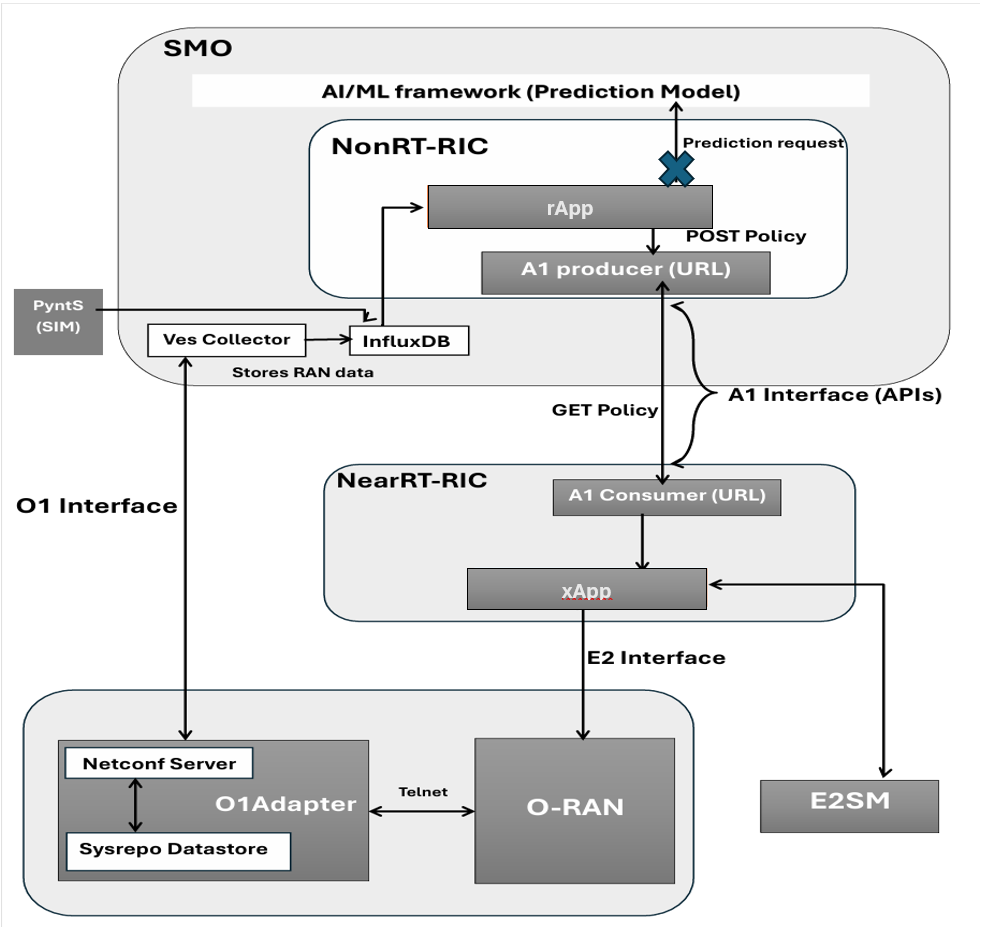
Note: This documentation is a replica of the README available at the github/ngkore/IOSMCN-OAI. Please refer to the original repository for the most up-to-date information.
1. Repository Setup
git clone https://github.com/ios-mcn/ios-mcn-releases.git
cd ios-mcn-releases/Agartala/v0.4.0/SMO/source-code
tar -xf iosmcn.agartala.v0.4.0.smo.source.tar
mv iosmcn.agartala.v0.4.0.smo.source ~/smo/
cd ~/smo/
Extract SMO components:
for f in *.tar.gz; do tar -xzf "$f"; done

mkdir tar_files
mv *.tar.gz tar_files/
2. Documentation Viewer (Optional)
The SMO repo includes Sphinx-based documentation. To view it locally, set up a Docker-based Sphinx viewer.
cd ~/ios-mcn-releases/Agartala/v0.4.0/SMO
Create Dockerfile:
FROM alpine:latest
WORKDIR /
RUN mkdir -p /Sphinx/build

RUN apk add --no-cache python3 py3-pip make git
RUN pip3 install git+https://github.com/sphinx-doc/sphinx --break-system-packages && \
    pip3 install sphinx-autobuild --break-system-packages

ADD ./documentation/requirements-docs.txt /Sphinx

RUN pip3 install -r /Sphinx/requirements-docs.txt --break-system-packages

CMD sphinx-autobuild -b html -n --host 0.0.0.0 --port 80 /Sphinx/source /Sphinx/build
Create docker-compose.yaml:
version: "3"

services:
  service_doc:
    container_name: service_doc
    build: ./
    volumes:
      - ./documentation:/Sphinx/source
      - ./build:/Sphinx/build
    ports:
      - 9999:80
Launch the documentation service
docker compose up -d
Access documentation at:
http://<host-ip>:9999
Stop the viewer:
docker compose down
3. OAM Component Deployment
This is the docker based deployment method for OAM component.
Go to the OAM directory:
cd ~/smo/oam-0.4.0.iosmcn.smo.oam/
chmod -R +x .
Install dependencies:
sudo apt install openjdk-25-jre-headless jq
Check keytool:
keytool --help
Identify hostname and IP:
ubuntu@ubuntu:~$ hostname
ubuntu
ubuntu@ubuntu:~$ hostname -I
10.228.98.131 172.17.0.1 192.168.70.129 172.18.0.1
From this:
<host-name>=ubuntu<deployment-system-ipv4>=10.228.98.131<your-system>=<host-name>.<domain>=ubuntu.iosmcn.org(domainiosmcn.orgin this example, you can use any domain as long as it is a local deployment)
Update
/etc/hosts:
sudo vim /etc/hosts
Add this template (generic form):
127.0.0.1                   localhost
127.0.1.1                   <host-name>

# SMO OAM development system
<deployment-system-ipv4>                    <your-system>
<deployment-system-ipv4>            gateway.<your-system>
<deployment-system-ipv4>           identity.<your-system>
<deployment-system-ipv4>           messages.<your-system>
<deployment-system-ipv4>       kafka-bridge.<your-system>
<deployment-system-ipv4>          odlux.oam.<your-system>
<deployment-system-ipv4>          flows.oam.<your-system>
<deployment-system-ipv4>          tests.oam.<your-system>
<deployment-system-ipv4>     controller.dcn.<your-system>
<deployment-system-ipv4>  ves-collector.dcn.<your-system>
<deployment-system-ipv4>              minio.<your-system>
<deployment-system-ipv4>           redpanda.<your-system>
<deployment-system-ipv4>              nrtcp.<your-system>
example:
127.0.0.1                   localhost
127.0.1.1                   ubuntu

# SMO OAM development system
10.228.98.131 ubuntu.iosmcn.org
10.228.98.131 gateway.ubuntu.iosmcn.org
10.228.98.131 identity.ubuntu.iosmcn.org
10.228.98.131 messages.ubuntu.iosmcn.org
10.228.98.131 kafka-bridge.ubuntu.iosmcn.org
10.228.98.131 odlux.oam.ubuntu.iosmcn.org
10.228.98.131 flows.oam.ubuntu.iosmcn.org
10.228.98.131 tests.oam.ubuntu.iosmcn.org
10.228.98.131 controller.dcn.ubuntu.iosmcn.org
10.228.98.131 ves-collector.dcn.ubuntu.iosmcn.org
10.228.98.131 minio.ubuntu.iosmcn.org
10.228.98.131 redpanda.ubuntu.iosmcn.org
10.228.98.131 nrtcp.ubuntu.iosmcn.org
Update
.envto correct the images path and versions:
sed -i -e 's/ios-mcn-smo/ios-mcn/g' -e 's/1.2.2/1.2.1/g' .env
Run environment adaptation:
# python3 adapt_to_environment -i <deployment-system-ipv4> -d <your-system>
python3 adapt_to_environment -i 10.228.98.131 -d ubuntu.iosmcn.org
Bring up OAM stack
./docker-setup.sh
This orchestrates the OAM-related Docker services using your /etc/hosts mappings.
Access OAM services
Service |
Username |
Password |
URL |
|---|---|---|---|
Grafana |
admin |
admin |
|
InfluxDB |
admin |
mySuP3rS3cr3tT0keN |
|
Redpanda |
- |
- |
|
ODLUX |
admin |
Kp8bJ4SXszM0WXlhak3eHlcse2gAw84vaoGGmJvUy2U |
|
Non-RT RIC Control Panel |
- |
- |
|
O1-Adapter Integration
To connect the OAI O1-Adapter with SMO OAM, we need to adjust the VES URL. However, these changes are already incorporated in the iosmcn-oai-o1-adapter, but for clarity, here are the steps again for each deployment method. Do the following changes to match VES Configurations.
# VES Collector Configuration
IP: <deployment-system-ipv4>
Port: 8080
Version: v7
Protocol: http
Username: sample1
Password: sample1
For Docker-Based Deployment Method:
Update the ves.url parameter in o1-adapter/docker/config/config.json to http://<deployment-system-ipv4>:8080/eventListener/v7.
For Source-Based Deployment Method:
Update the ves.url parameter in o1-adapter/src/config/config.json to http://<deployment-system-ipv4>:8080/eventListener/v7.
For Makefile-Based Deployment Method:
Update the o1-adapter/integration/.env file:
Add a new variable
VES_PORTand set a default value of8080.VES_PORT=8080
Change
VES_COLLECTOR_URLvalue fromhttps://${VES_FQDN}/eventListener/v7tohttp://${VES_IP}:${VES_PORT}/eventListener/v7
4. FOCoM Component Deployment (optional)
Navigate to FOCoM:
cd ../focom-0.4.0.iosmcn.smo.focom/
Install required tools:
sudo apt update
sudo apt install git curl make net-tools pipx python3-venv
Install Ansible via
pipx:
pipx install --include-deps ansible
pipx ensurepath
echo 'export PATH="$HOME/.local/bin:$PATH"' >> ~/.bashrc
source ~/.bashrc
Enter the Docker automation directory:
cd docker/
Create
docker.yaml:
- hosts: all
  become: true
  roles:
    - ansible-role-docker
Create
inventory.ini:
[servers]
localhost ansible_connection=local
Run the Docker installation role
ansible-playbook -i inventory.ini docker.yaml
This prepares Docker on the host using the Ansible role.
5. Near-RT RIC and Unified Dashboard
Will be added soon.