OAI F1AP Split
Author: Shankar Malik
Published: November 30, 2025
This guide explains how to deploy and run the OAI gNB Central Unit (CU) and Distributed Unit (DU) in F1 split mode.
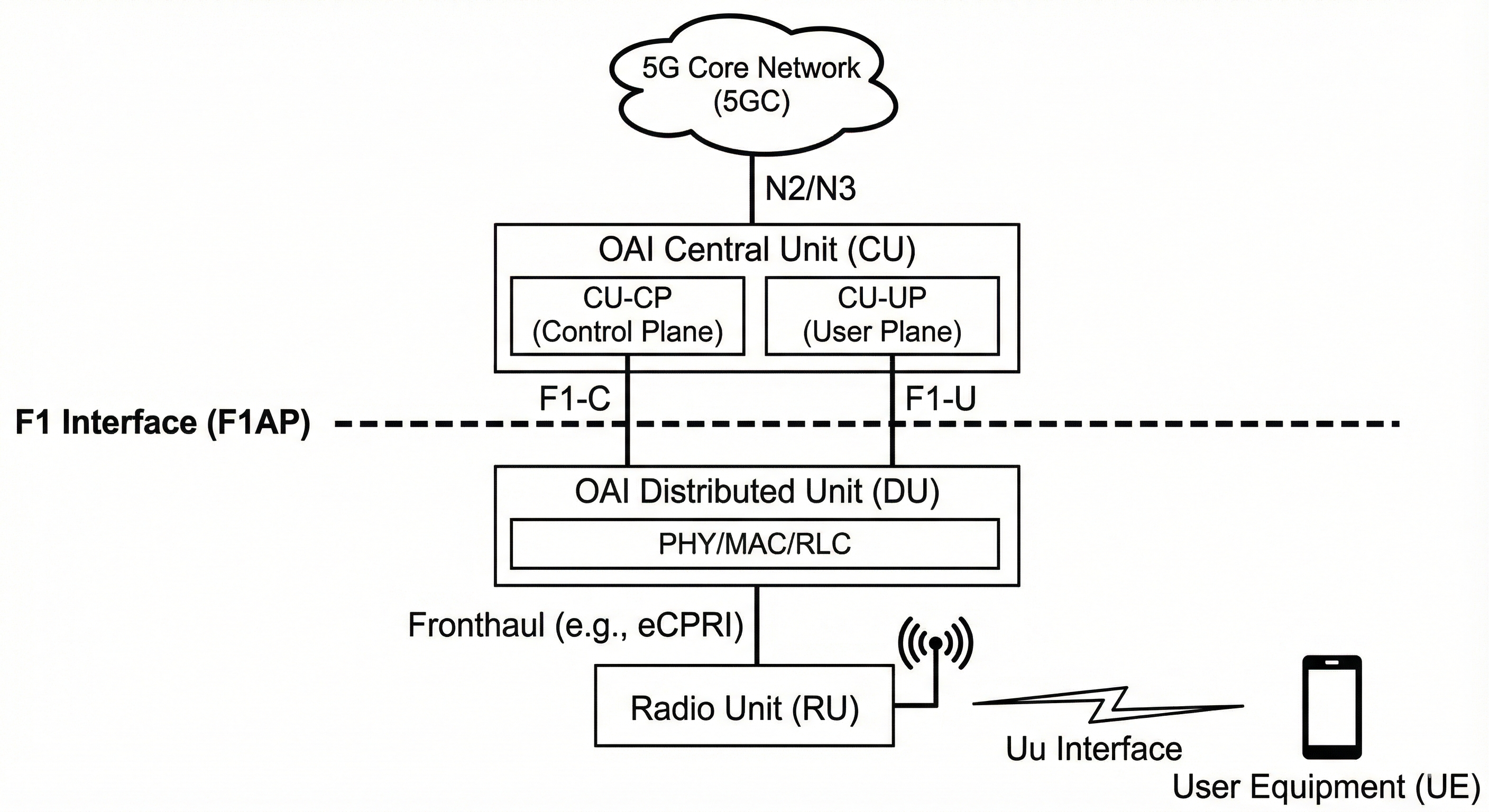
Note: This documentation is a replica of the README available at the github/ngkore/OAI_F1AP_Split. Please refer to the original repository for the most up-to-date information.
You can run the CU/DU setup in two ways:
On the same server
On different servers
For a complete end-to-end (E2E) test, you will need:
UE (OAI nrUE)
gNB DU
gNB CU
OAI 5G Core (CN5G)
Before starting, ensure the OAI 5G Core is installed and configured:
OAI CN5G Setup Follow: https://gitlab.eurecom.fr/oai/openairinterface5g/-/blob/develop/doc/NR_SA_Tutorial_OAI_CN5G.md
Once the core is running, proceed to deploying the CU and DU.
For more details on F1 interface configuration, refer to: https://gitlab.eurecom.fr/oai/openairinterface5g/-/blob/develop/doc/F1AP/F1-design.md#how-to-run
1. Running CU and DU on the Same Server
Expand steps
Prerequisites: Build UHD from Source (Optional – only for real SDR testing)
If you want to test with real radios (SDRs) instead of RFsim, build UHD:
# https://files.ettus.com/manual/page_build_guide.html
sudo apt install -y autoconf automake build-essential ccache cmake cpufrequtils doxygen ethtool g++ git inetutils-tools libboost-all-dev libncurses-dev libusb-1.0-0 libusb-1.0-0-dev libusb-dev python3-dev python3-mako python3-numpy python3-requests python3-scipy python3-setuptools python3-ruamel.yaml

git clone https://github.com/EttusResearch/uhd.git ~/uhd
cd ~/uhd
git checkout v4.8.0.0
cd host
mkdir build
cd build
cmake ../
make -j $(nproc)
make test # optional
sudo make install
sudo ldconfig
sudo uhd_images_downloader
Build OAI gNB and nrUE
git clone https://gitlab.eurecom.fr/oai/openairinterface5g.git ~/openairinterface5g
cd ~/openairinterface5g
git checkout develop

cd ~/openairinterface5g/cmake_targets
./build_oai -I

sudo apt install -y libforms-dev libforms-bin

cd ~/openairinterface5g/cmake_targets
./build_oai -w SIMU --ninja --nrUE --gNB --build-lib "nrscope" -C
Note: Use
-w USRPinstead of-w SIMUif building for real SDR testing.
Configure CU and DU
Patch files (Same server): https://github.com/ngkore/OAI_CU_DU_Split/tree/main/patch_files/same-server
cd ~/openairinterface5g
wget https://raw.githubusercontent.com/ngkore/OAI_CU_DU_Split/refs/heads/main/patch_files/same-server/cu.patch
wget https://raw.githubusercontent.com/ngkore/OAI_CU_DU_Split/refs/heads/main/patch_files/same-server/du.patch
git apply cu.patch
git apply du.patch
Run CU and DU
Run CU
cd ~/openairinterface5g
sudo cmake_targets/ran_build/build/nr-softmodem -O ci-scripts/conf_files/gnb-cu.sa.band78.106prb.conf
Run DU
cd ~/openairinterface5g
sudo cmake_targets/ran_build/build/nr-softmodem -O ci-scripts/conf_files/gnb-du.sa.band78.106prb.rfsim.conf --rfsim
Remove --rfsim if running with USRP.
Run OAI nrUE
With USRP B210
cd ~/openairinterface5g/cmake_targets/ran_build/build
sudo ./nr-uesoftmodem -r 106 --numerology 1 --band 78 -C 3619200000 --ue-fo-compensation -E --uicc0.imsi 001010000000001
With RFsim
cd ~/openairinterface5g/cmake_targets/ran_build/build
sudo ./nr-uesoftmodem -r 106 --numerology 1 --band 78 -C 3619200000 --uicc0.imsi 001010000000001 --rfsim
E2E Connectivity Test (RFsim Mode)
UE → CN5G
ping 192.168.70.135 -I oaitun_ue1
UE → Internet
ping 8.8.8.8 -I oaitun_ue1
2. Running CU and DU on Different Servers
Expand steps
Topology
Server 1: CN5G + gNB CU
Server 2: gNB DU + UE
Build UHD (Optional, only on DU server)
Same instructions as above. Only required for real SDR testing.
Build OAI gNB and nrUE on both servers
git clone https://gitlab.eurecom.fr/oai/openairinterface5g.git ~/openairinterface5g
cd ~/openairinterface5g
git checkout develop

cd ~/openairinterface5g/cmake_targets
./build_oai -I
sudo apt install -y libforms-dev libforms-bin

cd ~/openairinterface5g/cmake_targets
./build_oai -w SIMU --ninja --nrUE --gNB --build-lib "nrscope" -C
Use -w USRP on DU server if using SDR.
Configure CU and DU
Patch files: https://github.com/ngkore/OAI_CU_DU_Split/tree/main/patch_files/different-servers
cd ~/openairinterface5g

# On CU server
wget https://raw.githubusercontent.com/ngkore/OAI_CU_DU_Split/refs/heads/main/patch_files/different-servers/cu.patch
git apply cu.patch

# On DU server
wget https://raw.githubusercontent.com/ngkore/OAI_CU_DU_Split/refs/heads/main/patch_files/different-servers/du.patch
git apply du.patch
Update IPs as shown in the patch:
CU config
local_s_address = "CU_Server_IP";
remote_s_address = "DU_Server_IP";
DU config
local_n_address = "DU_Server_IP";
remote_n_address = "CU_Server_IP";
Run CU and DU
CU server
cd ~/openairinterface5g
sudo cmake_targets/ran_build/build/nr-softmodem -O ci-scripts/conf_files/gnb-cu.sa.band78.106prb.conf
DU server
cd ~/openairinterface5g
sudo cmake_targets/ran_build/build/nr-softmodem -O ci-scripts/conf_files/gnb-du.sa.band78.106prb.rfsim.conf --rfsim
Remove --rfsim if running with USRP.
Run OAI nrUE (on DU server)
With USRP B210
cd ~/openairinterface5g/cmake_targets/ran_build/build
sudo ./nr-uesoftmodem -r 106 --numerology 1 --band 78 -C 3619200000 --ue-fo-compensation -E --uicc0.imsi 001010000000001
With RFsim
cd ~/openairinterface5g/cmake_targets/ran_build/build
sudo ./nr-uesoftmodem -r 106 --numerology 1 --band 78 -C 3619200000 --uicc0.imsi 001010000000001 --rfsim
E2E Connectivity Test (RFsim Mode)
UE → CN5G
ping 192.168.70.135 -I oaitun_ue1
UE → Internet
ping 8.8.8.8 -I oaitun_ue1
Logs
Sample logs for CU and DU are available here