OAI RAN
Author: Shivank Chaudhary, Aditya Koranga & Shubham Kumar
Published: August 16, 2024
This guide covers the deployment of the OpenAirInterface (OAI) Radio Access Network (RAN), including gNB and nrUE.
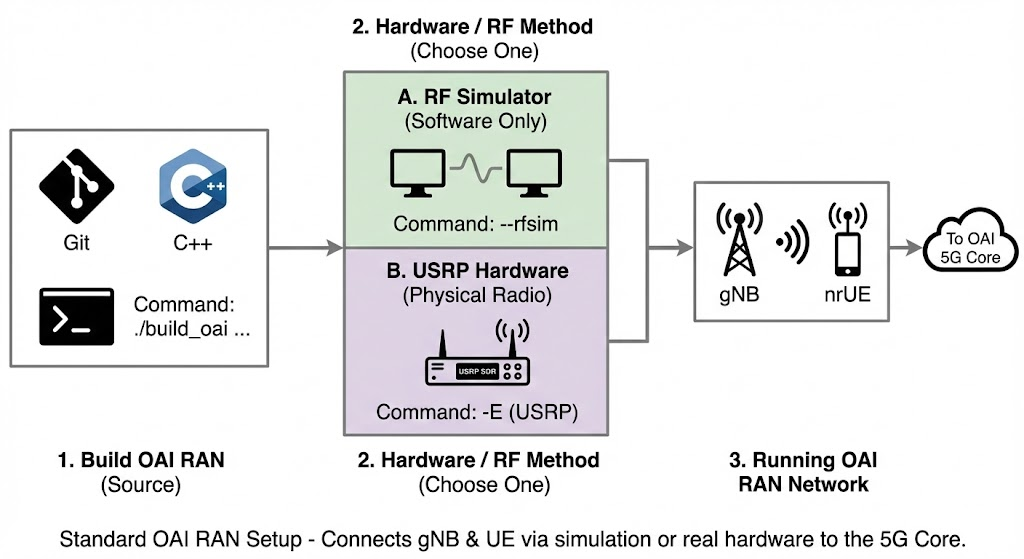
For the official documentation, please refer to the OAI RAN Deployment Guide. This guide assumes you have already deployed the OAI 5G Core. Follow this ngkore/OAI-CN5G repository for core deployment instructions.
Note: This documentation is a replica of the README available at the github/ngkore/OAI-RAN. Please refer to the original repository for the most up-to-date information.
1. System Preparation
1.1 Install General Dependencies
Install the necessary build tools and libraries for OAI.
sudo apt update
sudo apt install -y autoconf automake build-essential ccache cmake cpufrequtils \
  doxygen ethtool g++ git inetutils-tools libboost-all-dev libncurses-dev \
  libusb-1.0-0 libusb-1.0-0-dev libusb-dev python3-dev python3-mako \
  python3-numpy python3-requests python3-scipy python3-setuptools python3-ruamel.yaml \
  libcap-dev libblas-dev liblapacke-dev libatlas-base-dev
1.2 Install Scope Dependencies
Required for the nrscope visualization tool.
sudo apt install -y libforms-dev libforms-bin
1.3 Install yaml-cpp (Source Build Required)
Important: Do not install
yaml-cppusingsudo apt install libyaml-cpp-devas it is known to cause build failures (see below). Build it from source instead.
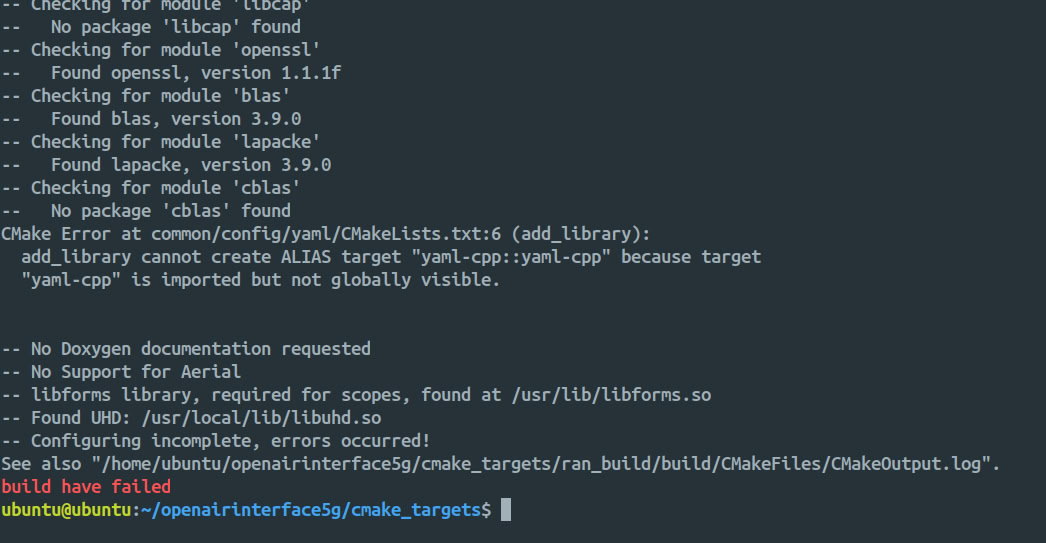
cd
git clone https://github.com/jbeder/yaml-cpp.git
cd yaml-cpp
mkdir build && cd build
cmake .. -DYAML_BUILD_SHARED_LIBS=ON
make -j$(nproc)
sudo make install
sudo ldconfig
cd
rm -r yaml-cpp/
1.4 Install UHD (Only for USRP Hardware)
If you are using RF Simulator only, you may skip this. For USRP Hardware, this is mandatory. Either follow the UHD Build Guide or use the commands below:
git clone https://github.com/EttusResearch/uhd.git ~/uhd
cd ~/uhd
git checkout v4.7.0.0
cd host
mkdir build
cd build
cmake ../
make -j $(nproc)
# make test # Optional
sudo make install
sudo ldconfig
sudo uhd_images_downloader
2. Build OAI RAN
2.1 Clone Repository
git clone https://gitlab.eurecom.fr/oai/openairinterface5g.git ~/openairinterface5g
cd ~/openairinterface5g
# git checkout -f v2.1.0
git checkout develop
2.2 Install OAI dependencies
cd ~/openairinterface5g/cmake_targets
./build_oai -I
2.3 Build OAI gNB and nrUE
This command builds both the gNB and UE with support for the OAI Scope and Ninja build system.
cd ~/openairinterface5g/cmake_targets
./build_oai -w USRP --ninja --nrUE --gNB --build-lib "nrscope" -C
Note: If you used docker compose to deploy OAI 5G Core (option A from ngkore/OAI-CN5G) then you likely do not need to make any changes. But if you used python wrapper to deploy OAI 5G (option B from ngkore/OAI-CN5G), then follow the step 5.
3. Run OAI gNB
USRP B210
cd ~/openairinterface5g/cmake_targets/ran_build/build
sudo ./nr-softmodem -O ../../../targets/PROJECTS/GENERIC-NR-5GC/CONF/gnb.sa.band78.fr1.106PRB.usrpb210.conf --gNBs.[0].min_rxtxtime 6 -E --continuous-tx
USRP N300
cd ~/openairinterface5g/cmake_targets/ran_build/build
sudo ./nr-softmodem -O ../../../targets/PROJECTS/GENERIC-NR-5GC/CONF/gnb.sa.band77.fr1.273PRB.2x2.usrpn300.conf --gNBs.[0].min_rxtxtime 6 --usrp-tx-thread-config 1
USRP X300
cd ~/openairinterface5g/cmake_targets/ran_build/build
sudo ./nr-softmodem -O ../../../targets/PROJECTS/GENERIC-NR-5GC/CONF/gnb.sa.band77.fr1.273PRB.2x2.usrpn300.conf --gNBs.[0].min_rxtxtime 6 --usrp-tx-thread-config 1 -E --continuous-tx
RFsimulator
cd ~/openairinterface5g/cmake_targets/ran_build/build
sudo ./nr-softmodem -O ../../../targets/PROJECTS/GENERIC-NR-5GC/CONF/gnb.sa.band78.fr1.106PRB.usrpb210.conf --gNBs.[0].min_rxtxtime 6 --rfsim
RFsimulator in FR2
cd ~/openairinterface5g/cmake_targets/ran_build/build
sudo ./nr-softmodem -O ../../../targets/PROJECTS/GENERIC-NR-5GC/CONF/gnb.sa.band257.u3.32prb.usrpx410.conf --rfsim
4. Run OAI nrUE
USRP B210
Note: This should be run in a second Ubuntu 22.04 host, other than gNB. It only applies when running OAI gNB with USRP B210.
cd ~/openairinterface5g/cmake_targets/ran_build/build
sudo ./nr-uesoftmodem -r 106 --numerology 1 --band 78 -C 3619200000 --ue-fo-compensation -E --uicc0.imsi 001010000000001
RFsimulator
Note: This should be run on the same host as the OAI gNB. It only applies when running OAI gNB with RFsimulator.
cd ~/openairinterface5g/cmake_targets/ran_build/build
sudo ./nr-uesoftmodem -r 106 --numerology 1 --band 78 -C 3619200000 --uicc0.imsi 001010000000001 --rfsim
RFsimulator in FR2
Note: This should be run on the same host as the OAI gNB. It only applies when running OAI gNB with RFsimulator in FR2.
cd ~/openairinterface5g/cmake_targets/ran_build/build
sudo ./nr-uesoftmodem -r 32 --numerology 3 --band 257 -C 27533280000 --uicc0.imsi 001010000000001 --ssb 72 --rfsim
End-to-End Connectivity Test
Ping test from the UE host to the CN5G
ping 192.168.70.135 -I oaitun_ue1
5. Steps to follow if using python wrapper for OAI 5G Core deployment
5.1 Configuration Changes
Apply the patch file:
git apply patch-files/openairinterface5g.patch
Or manually do these changes for consistent user profile across 5G Core and RAN:
diff --git a/targets/PROJECTS/GENERIC-NR-5GC/CONF/gnb.sa.band78.fr1.106PRB.usrpb210.conf b/targets/PROJECTS/GENERIC-NR-5GC/CONF/gnb.sa.band78.fr1.106PRB.usrpb210.conf
index 7f750d7259..4ae4fddca3 100644
--- a/targets/PROJECTS/GENERIC-NR-5GC/CONF/gnb.sa.band78.fr1.106PRB.usrpb210.conf
+++ b/targets/PROJECTS/GENERIC-NR-5GC/CONF/gnb.sa.band78.fr1.106PRB.usrpb210.conf
@@ -10,8 +10,8 @@ gNBs =
     gNB_name  =  "gNB-OAI";

     // Tracking area code, 0x0000 and 0xfffe are reserved values
-    tracking_area_code  =  1;
-    plmn_list = ({ mcc = 001; mnc = 01; mnc_length = 2; snssaiList = ({ sst = 1; }) });
+    tracking_area_code  =  0xa000;
+    plmn_list = ({ mcc = 208; mnc = 95; mnc_length = 2; snssaiList = ({ sst = 1; sd = 0xffffff; }) });

     nr_cellid = 12345678L;

diff --git a/targets/PROJECTS/GENERIC-NR-5GC/CONF/ue.conf b/targets/PROJECTS/GENERIC-NR-5GC/CONF/ue.conf
index 4cea93ea46..a6e099c89f 100644
--- a/targets/PROJECTS/GENERIC-NR-5GC/CONF/ue.conf
+++ b/targets/PROJECTS/GENERIC-NR-5GC/CONF/ue.conf
@@ -1,10 +1,10 @@
 uicc0 = {
-imsi = "2089900007487";
-key = "fec86ba6eb707ed08905757b1bb44b8f";
-opc= "C42449363BBAD02B66D16BC975D77CC1";
+imsi = "208950000000031";
+key = "0C0A34601D4F07677303652C0462535B";
+opc= "63bfa50ee6523365ff14c1f45f88737d";
 dnn= "oai";
 nssai_sst=1;
-nssai_sd=1;
+nssai_sd=0xffffff;
 }

 position0 = {
5.2 Run gNB (RF Simulator Mode)
Navigate to the build directory and run the gNB in RFsimulator mode:
cd openairinterface5g/cmake_targets/ran_build/build

sudo ./nr-softmodem \
  -O ../../../targets/PROJECTS/GENERIC-NR-5GC/CONF/gnb.sa.band78.fr1.106PRB.usrpb210.conf \
  -E \
  --rfsim \
  --rfsimulator.serveraddr server \
  --gNBs.[0].min_rxtxtime 6
5.3 Run NR UE (RFsim Mode)
sudo ./nr-uesoftmodem \
  -r 106 \
  --numerology 1 \
  --band 78 \
  -C 3619200000 \
  --rfsim \
  --rfsimulator.serveraddr 127.0.0.1 \
  -E \
  -O ../../../targets/PROJECTS/GENERIC-NR-5GC/CONF/ue.conf