OAI NR-5G NTN
Author: Shankar Malik
Published: December 07, 2025
This repository provides a simple, repeatable guide for deploying and testing Non-Terrestrial Network (NTN) support in OpenAirInterface (OAI) using RFsimulated GEO and LEO satellite scenarios.
Official reference documentation: https://gitlab.eurecom.fr/oai/openairinterface5g/-/blob/develop/doc/RUNMODEM.md#how-to-run-a-ntn-configuration
Note: This documentation is a replica of the README available at the github/ngkore/OAI-5G-NR-NTN. Please refer to the original repository for the most up-to-date information.
Overview
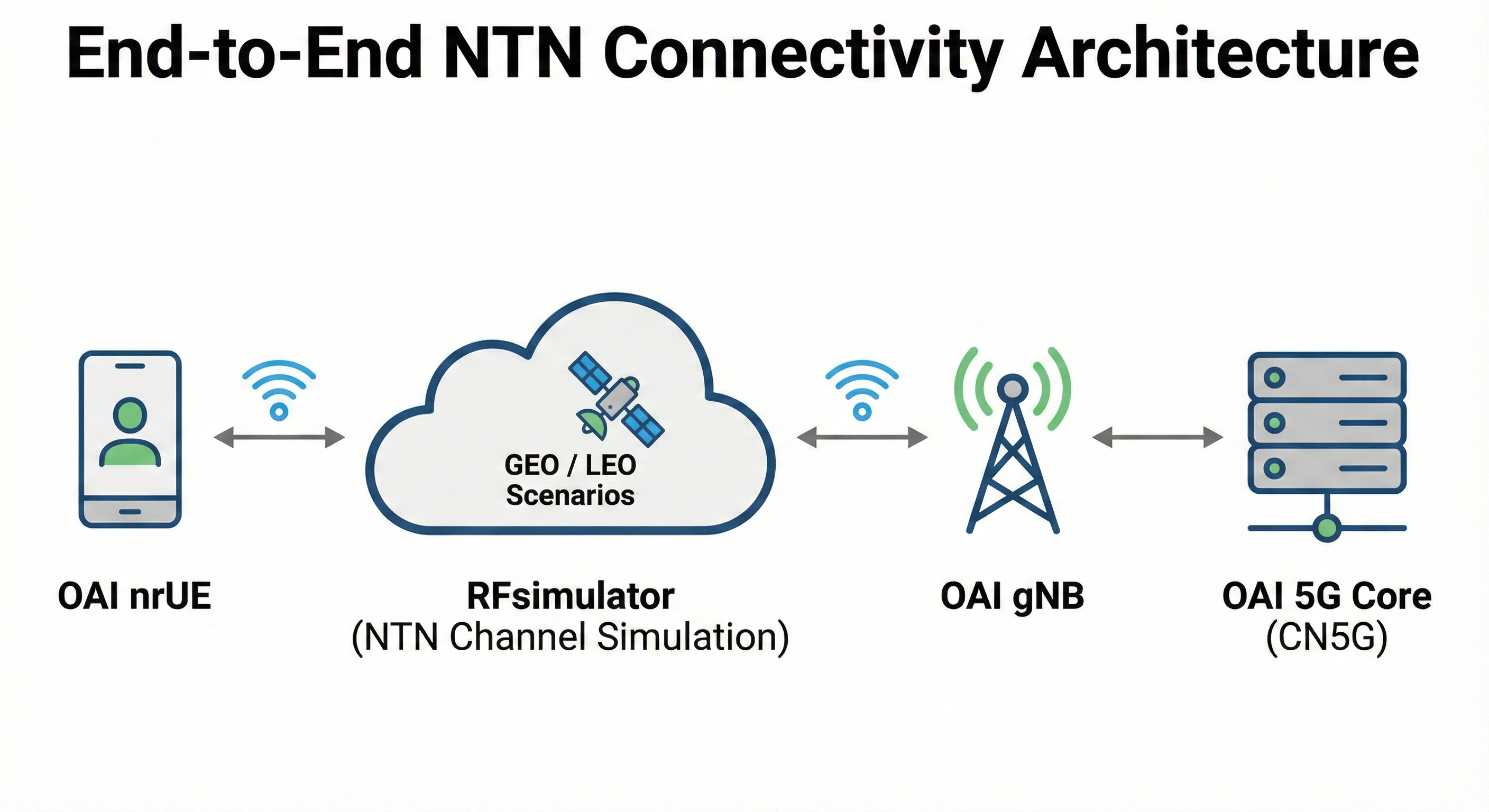
This setup runs in simulated NTN mode using RFsimulator. For a complete NTN End-to-End (E2E) test, you will need:
OAI nrUE
RFsimulator (NTN channel simulation)
OAI gNB
OAI 5G Core (CN5G)
Two satellite orbit modes are supported:
GEO (Geostationary Orbit)
LEO (Low Earth Orbit) - coming soon
Prerequisites
Before proceeding, ensure the OAI 5G Core (CN5G) is installed and running.
Setup guide: https://gitlab.eurecom.fr/oai/openairinterface5g/-/blob/develop/doc/NR_SA_Tutorial_OAI_CN5G.md
1. GEO Satellite Simulation
Click to expand steps
Step 1 - Build OAI gNB and nrUE
git clone https://gitlab.eurecom.fr/oai/openairinterface5g.git ~/openairinterface5g
cd ~/openairinterface5g
git checkout develop

cd ~/openairinterface5g/cmake_targets
./build_oai -I

sudo apt install -y libforms-dev libforms-bin

cd ~/openairinterface5g/cmake_targets
./build_oai -w SIMU --ninja --nrUE --gNB --build-lib "nrscope" -C
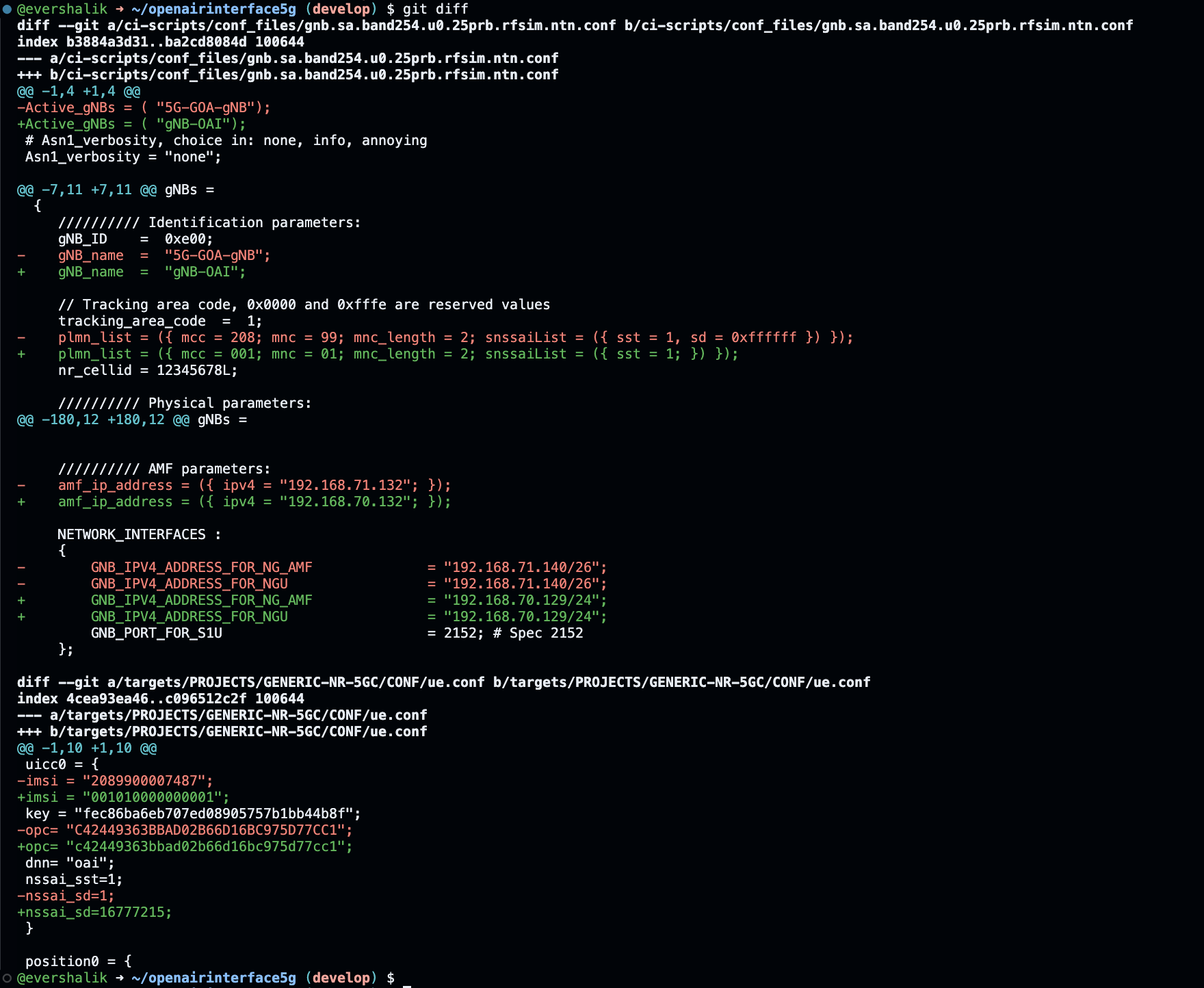
Step 2 - Apply NTN Configuration
Configuration details reference: https://gitlab.eurecom.fr/oai/openairinterface5g/-/blob/develop/doc/RUNMODEM.md#gnb
Download and apply the required patch:
cd ~/openairinterface5g
wget https://raw.githubusercontent.com/ngkore/OAI_NTN_RFSim/refs/heads/main/patch_files/ntn-geo.patch
git apply ntn-geo.patch
This patch includes all required NTN parameter changes:
Step 3 - Run the gNB and UE
Run OAI gNB
cd cmake_targets
sudo ./ran_build/build/nr-softmodem -O ../ci-scripts/conf_files/gnb.sa.band254.u0.25prb.rfsim.ntn.conf --rfsim --rfsimulator.prop_delay 238.74
Run OAI nrUE (FDD, 5MHz BW, 15 kHz SCS)
cd cmake_targets
sudo ./ran_build/build/nr-uesoftmodem -O ../targets/PROJECTS/GENERIC-NR-5GC/CONF/ue.conf --band 254 -C 2488400000 --CO -873500000 -r 25 --numerology 0 --ssb 60 --rfsim --rfsimulator.prop_delay 238.74
Step 4 - Test End-to-End Connectivity
UE → CN5G
ping 192.168.70.135 -I oaitun_ue1
2. LEO Satellite Simulation
Coming soon.
Logs
Sample logs for GEO simulation are available here
Note: This guide focuses on simulation with RFsimulator. For real SDR NTN testing, additional configuration steps will be added later. Tested on OAI
developbranch.