IOSMCN RAN
Author: Shubham Kumar & Ronak Kanthaliya
Published: November 19, 2025
Please refer to OAI for the official documentation.
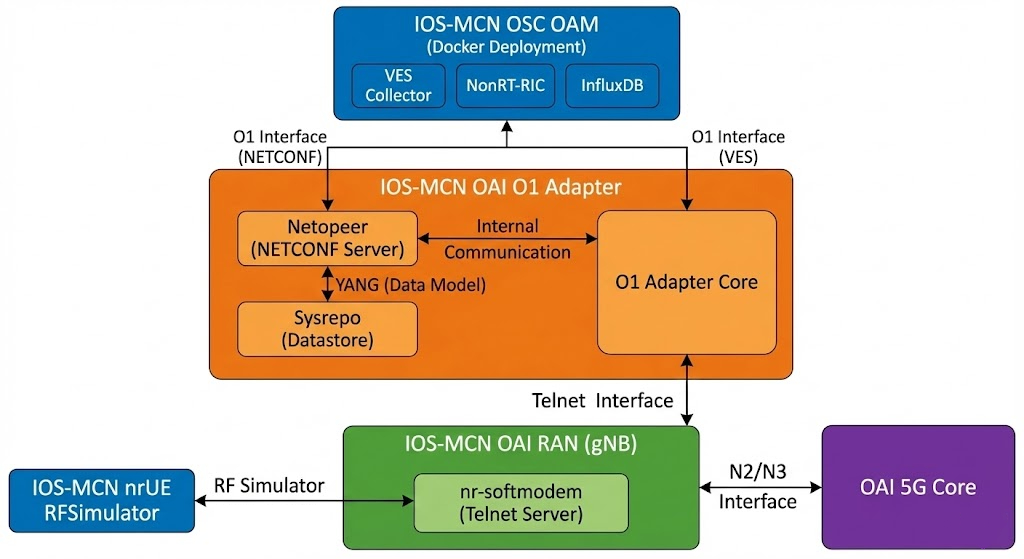
Note: This documentation is a replica of the README available at the github/ngkore/IOSMCN-OAI. Please refer to the original repository for the most up-to-date information.
System Preparation
Install General Dependencies
Install the necessary build tools and libraries for OAI.
sudo apt update
sudo apt install -y autoconf automake build-essential ccache cmake cpufrequtils \
  doxygen ethtool g++ git inetutils-tools libboost-all-dev libncurses-dev \
  libusb-1.0-0 libusb-1.0-0-dev libusb-dev python3-dev python3-mako \
  python3-numpy python3-requests python3-scipy python3-setuptools python3-ruamel.yaml \
  libcap-dev libblas-dev liblapacke-dev libatlas-base-dev
Install Scope Dependencies
Required for the nrscope visualization tool.
sudo apt install -y libforms-dev libforms-bin
Install yaml-cpp from source
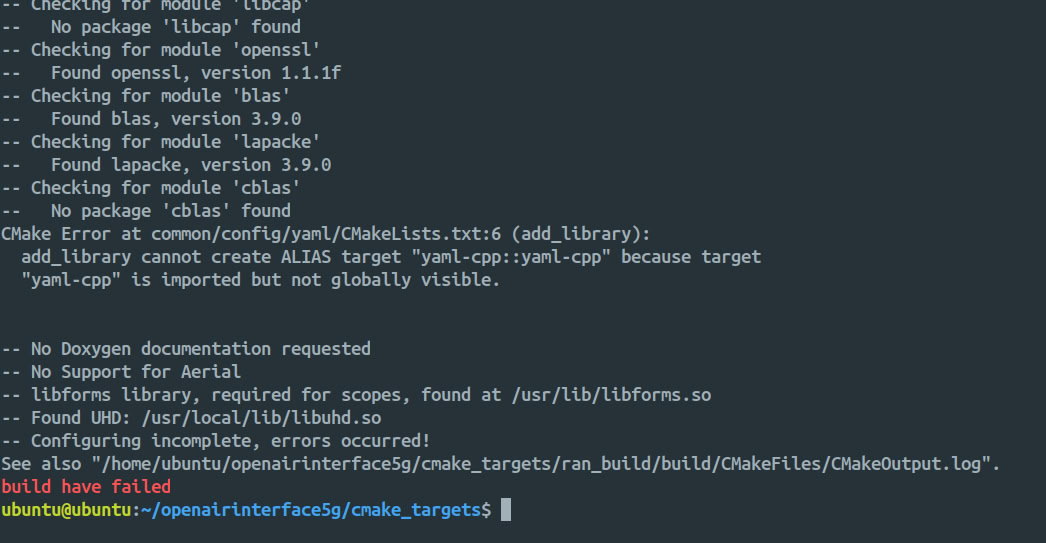
Important: Do not install
yaml-cppusingsudo apt install libyaml-cpp-devas it is known to cause build failures (see below). Build it from source instead.
cd
git clone https://github.com/jbeder/yaml-cpp.git
cd yaml-cpp
mkdir build && cd build
cmake .. -DYAML_BUILD_SHARED_LIBS=ON
make -j$(nproc)
sudo make install
sudo ldconfig
cd
rm -r yaml-cpp/
Install UHD (Only for USRP Hardware)
If you are planning to test it in RF Simulator mode only, then you can skip this. For USRP Hardware, this is mandatory. Either follow the UHD Build Guide or use the commands below:
git clone https://github.com/EttusResearch/uhd.git ~/uhd
cd ~/uhd
git checkout v4.7.0.0
cd host
mkdir build
cd build
cmake ../
make -j $(nproc)
# make test # Optional
sudo make install
sudo ldconfig
sudo uhd_images_downloader
Build IOSMCN OAI RAN
Clone Repository
git clone https://github.com/ios-mcn/ios-mcn-releases.git
cd ios-mcn-releases/Agartala/v0.4.0/RAN/source-code/
tar -xzf ios-mcn-ran-0.4.0.iosmcn.ran.tar.gz
mv ios-mcn-ran-0.4.0.iosmcn.ran ~/ran
cd ~/ran/openairinterface5g/
Set Execute Permissions
Set execute permissions for all scripts and executables.
chmod -R +x .
Install dependencies
cd cmake_targets/
./build_oai -I
Build gNB and nrUE
This command builds both the gNB and UE with support for the OAI Scope and Ninja build system.
# replace SIMU with USRP if you want to build it for USRP hardware
./build_oai -w SIMU --ninja --nrUE --gNB --build-lib "nrscope" -C

# to build telnet management server - needed to communicate with O1 adapter
./build_oai --build-lib telnetsrv
Configuration Changes
Edit the gNB configuration file located at openairinterface5g/targets/PROJECTS/GENERIC-NR-5GC/CONF/gnb.sa.band78.fr1.106PRB.usrpb210.conf and make the following changes:
Change the
gNB_IDto0xe00.Remove th
sdvalue from theplmn_listsection. (removesd = 0x000000;).Change
amf_ip_addressto192.168.70.132.Change the
GNB_IPV4_ADDRESS_FOR_NG_AMFandGNB_IPV4_ADDRESS_FOR_NGUto192.168.70.129/24.
Run gNB (RFsim Mode)
cd ~/ran/openairinterface5g/cmake_targets/ran_build/build

sudo ./nr-softmodem \
  -O ../../../targets/PROJECTS/GENERIC-NR-5GC/CONF/gnb.sa.band78.fr1.106PRB.usrpb210.conf \
  --rfsim \
  --gNBs.[0].min_rxtxtime 6
Append the following flags to add telnet server support:
--telnetsrv \
--telnetsrv.listenport 9090 \
--telnetsrv.shrmod o1
Note: For USRP models, please refer ngkore/OAI-RAN repository.
Run nrUE (RFsim Mode)
Run this command on the same host as the OAI gNB.
cd ~/ran/openairinterface5g/cmake_targets/ran_build/build

sudo ./nr-uesoftmodem \
  -r 106 \
  --numerology 1 \
  --band 78 \
  -C 3619200000 \
  --rfsim \
  --uicc0.imsi 001010000000001
End-to-End Connectivity Test
Ping test from the UE host to the CN5G
ping 192.168.70.135 -I oaitun_ue1