OAI O1 Adapter
Author: Shubham Kumar
Published: December 24, 2025
This repository contains the OAI O1 Adapter deployment guide for integrating OAI gNB with an O-RAN-SC OAM components via the O1 interface.
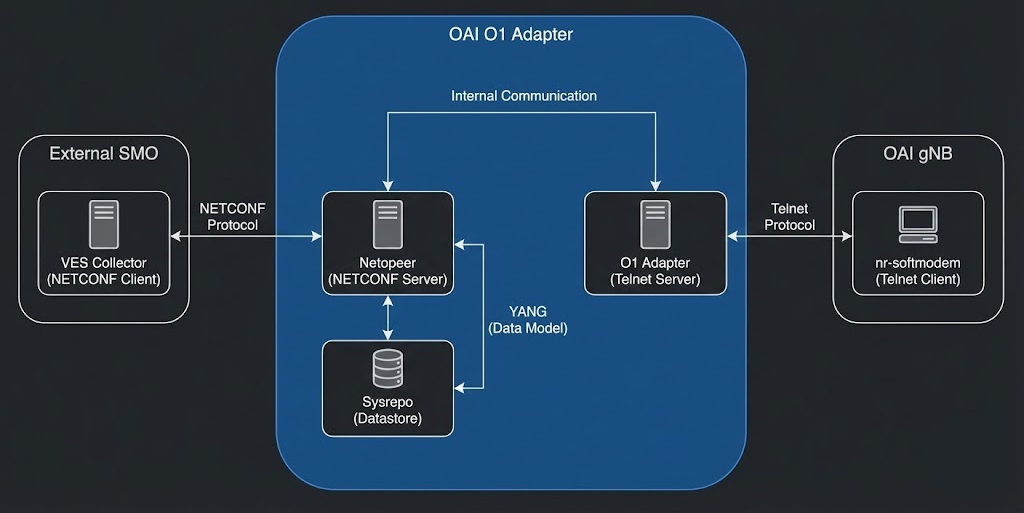
Note: This documentation is a replica of the README available at the github/ngkore/OAI-O1-Adapter. Please refer to the original repository for the most up-to-date information.
Pre-requisites
Install Docker:
# 1. Update and install basic tools
sudo apt update
sudo apt install -y git net-tools putty unzip ca-certificates curl make

# 2. Add Docker's official GPG key
sudo install -m 0755 -d /etc/apt/keyrings
sudo curl -fsSL https://download.docker.com/linux/ubuntu/gpg -o /etc/apt/keyrings/docker.asc
sudo chmod a+r /etc/apt/keyrings/docker.asc

# 3. Add the repository to Apt sources
echo "deb [arch=$(dpkg --print-architecture) signed-by=/etc/apt/keyrings/docker.asc] https://download.docker.com/linux/ubuntu $(. /etc/os-release && echo "$VERSION_CODENAME") stable" | sudo tee /etc/apt/sources.list.d/docker.list > /dev/null

# 4. Install Docker packages
sudo apt update
sudo apt install -y docker-ce docker-ce-cli containerd.io docker-buildx-plugin docker-compose-plugin docker-compose

# 5. Add current user to docker group (avoids using sudo for docker)
sudo usermod -a -G docker $(whoami)
Tip: Log out and back in to apply group changes or run
su - $USERto start a new session.
1. Repository Preparation
git clone https://gitlab.eurecom.fr/oai/o1-adapter.git
cd o1-adapter
2. Update Configuration
Update configuration before building as this is common for deployment methods — docker, source, or Makefile.
For docker, source and makefile-based builds:
Modify docker/config/config.json:
Set host IP address (
hostundernetworksection) and telnet server IP address (hostundertelnetsection) to host IP.Update the
ves.urlparameter tohttp://<HOST_IP>:<VES_SVC_PORT>/eventListener/v7to connect with the SMO VES Collector.
For Makefile-based builds only:
Update the
integration/.envfile as the values got further propagated tointegration/config/config.json.Rename the incorrect variable from
OAI_OAI_TELNET_HOSTtoOAI_TELNET_HOSTAdd a new variable
VES_PORTand set the value to <VES_SVC_PORT> from OSC OAM deployment.VES_PORT=<VES_SVC_PORT>
Change
VES_COLLECTOR_URLvalue fromhttps://${VES_FQDN}/eventListener/v7tohttp://${VES_IP}:${VES_PORT}/eventListener/v7Update
OAI_TELNET_PORTvalue to9091
Note: You can get the value of
<VES_SVC_PORT>from the ngkore/OSC-OAM.
3. Deployment Method 1: Docker-Based
3.1 Build the Adapter Container
Supported flags for build-adapter.sh:
Flag |
Description |
|---|---|
|
Build development container (debug tools included; not production-ready) |
|
Build production adapter container |
|
Disable docker build cache |
Build the adapter:
./build-adapter.sh --adapter
Tip: Rebuild after config changes using the same command.
3.2 Start Telnet Server (Separate Terminal)
The adapter uses a telnet-based interface to communicate with the RAN. Install dependencies:
sudo apt update
sudo apt install python3-pip
pip3 install telnetlib3
Run the telnet test server:
cd o1-adapter/docker/scripts/
python3 servertest.py
3.3 Start the gNB Adapter
./start-adapter.sh --adapter
At this point, if the configuration is correct, the adapter will be listening for NETCONF clients and ready to communicate with the gNB’s telnet server.
4. Deployment Method 2: Source-Based Build
4.1 System Setup
sudo apt update && sudo apt upgrade -y
sudo apt install -y tzdata build-essential git cmake pkg-config unzip wget \
  libpcre2-dev zlib1g-dev libssl-dev autoconf libtool python3-pip

sudo apt install -y --no-install-recommends psmisc unzip wget openssl \
  openssh-client vsftpd openssh-server

pip3 install telnetlib3
4.2 NETCONF User Preparation
Create a dedicated system user:
sudo adduser --system netconf
echo "netconf:netconf!" | sudo chpasswd
SSH directory:
sudo mkdir -p /home/netconf/.ssh
sudo chmod 700 /home/netconf/.ssh
4.3 Configure OpenSSH for netconf User
Edit /etc/ssh/sshd_config:
sudo vim /etc/ssh/sshd_config
Append:
Match User netconf
       ChrootDirectory /
       X11Forwarding no
       AllowTcpForwarding no
       ForceCommand internal-sftp -d /ftp
Restart SSH:
sudo systemctl restart ssh
4.4 Configure vsftpd
Prepare directories:
sudo mkdir -p /ftp
sudo chown -R netconf:nogroup /ftp
sudo mkdir -p /var/run/vsftpd/empty
sudo mkdir -p /run/sshd
Edit /etc/vsftpd.conf:
sudo vim /etc/vsftpd.conf
Ensure the following settings are present:
listen=YES
listen_ipv6=NO
anonymous_enable=NO
local_enable=YES
write_enable=YES
local_umask=022
dirmessage_enable=YES
use_localtime=YES
xferlog_enable=YES
connect_from_port_20=YES
xferlog_std_format=YES
chroot_local_user=YES
allow_writeable_chroot=YES
secure_chroot_dir=/var/run/vsftpd/empty
pam_service_name=vsftpd
rsa_cert_file=/etc/ssl/certs/ssl-cert-snakeoil.pem
rsa_private_key_file=/etc/ssl/private/ssl-cert-snakeoil.key
ssl_enable=NO
userlist_enable=YES
userlist_file=/etc/vsftpd.userlist
userlist_deny=NO
Add netconf to /etc/vsftpd.userlist:
sudo vim /etc/vsftpd.userlist
Insert:
netconf
4.5 Prepare O1 Adapter Source Tree
The adapter expects configuration inside src/:
cp -r docker/config/ src/
4.6 Install NETCONF Dependencies
cd o1-adapter/docker/scripts/
sudo ./netconf_dep_install.sh
sudo ldconfig
Run hostkey merge utilities:
sudo /usr/local/share/netopeer2/merge_hostkey.sh
sudo /usr/local/share/netopeer2/merge_config.sh
Fetch and install YANG models:
mkdir -p yang
./get-yangs.sh
sudo ./install-yangs.sh
4.7 Build the gNB Adapter (Source)
cd ../../src/
./build.sh
Rebuild after config changes:
rm gnb-adapter
./build.sh
4.8 Start Supporting Processes
Terminal 1: NETCONF Server
sudo netopeer2-server -d -v3 -t 60
Terminal 2: Telnet Test Server
cd o1-adapter/docker/scripts/
python3 servertest.py
Terminal 3: gNB Adapter
export TERM=xterm-256color
cd o1-adapter/src/
sudo ./gnb-adapter
5. Deployment Method 3: Makefile-Based Deployment
Through Makefile, we can deploy the four different combinations depending on what you want to integrate with:
Adapter alone (no gNB, no SMO)
Adapter + telnet test server (fake gNB)
Adapter + SMO (real O-RAN SMO integration, but still needs a telnet server or real gNB)
Adapter + SMO + telnet test server (full O-RAN environment with fake gNB)
5.1 Launch Adapter Using Makefile
Standalone Adapter
make run-o1-oai-adapter
Adapter + Telnet Test Server
make run-o1-adapter-telnet
Important: The below methods for SMO are outdated and still expected to fail. See ngkore/OSC-OAM for more details on SMO deployment and integration.
Adapter + SMO
make run-o1-oai-adapter-smo
Adapter + SMO + Telnet Server
make run-o1-oai-adapter-smo-telnet
5.2 Teardown
make teardown
6. Testing the gNB Adapter with OAI gNB
Start NETCONF server (only for source-based builds). Skip this step if using docker or Makefile based adapter.
sudo netopeer2-server -d -v3 -t 60
6.3 Start gNB Adapter
Docker or Makefile-based deployment:
./start-adapter.sh --adapter
Source build deployment:
cd src/
sudo ./gnb-adapter
6.4 Start OAI gNB (RFsim + O1 Telnet)
Add following flags to gNB command to enable O1 telnet server on port 9091:
  --telnetsrv \
  --telnetsrv.listenport 9091 \
  --telnetsrv.shrmod o1